Start with a free sample
Sample lesson
Build your first Proxmox utility VM
A practical first lesson that creates a Debian VM, reserves an IP, installs baseline tools, and documents the service.
Open the sample lessonSample lesson
Install Docker Compose on the utility VM
Prepare the VM for simple self-hosted services with Docker, Compose, folders, and a test container.
Open the sample lessonSample lesson
Set up Uptime Kuma monitoring
Run a lightweight monitoring dashboard and add checks for your router, NAS, Proxmox host, and services.
Open the sample lessonSample diagram
Starter home lab topology
A simple network diagram for a router, switch, Proxmox host, NAS, UPS, and management workstation.
Download the diagram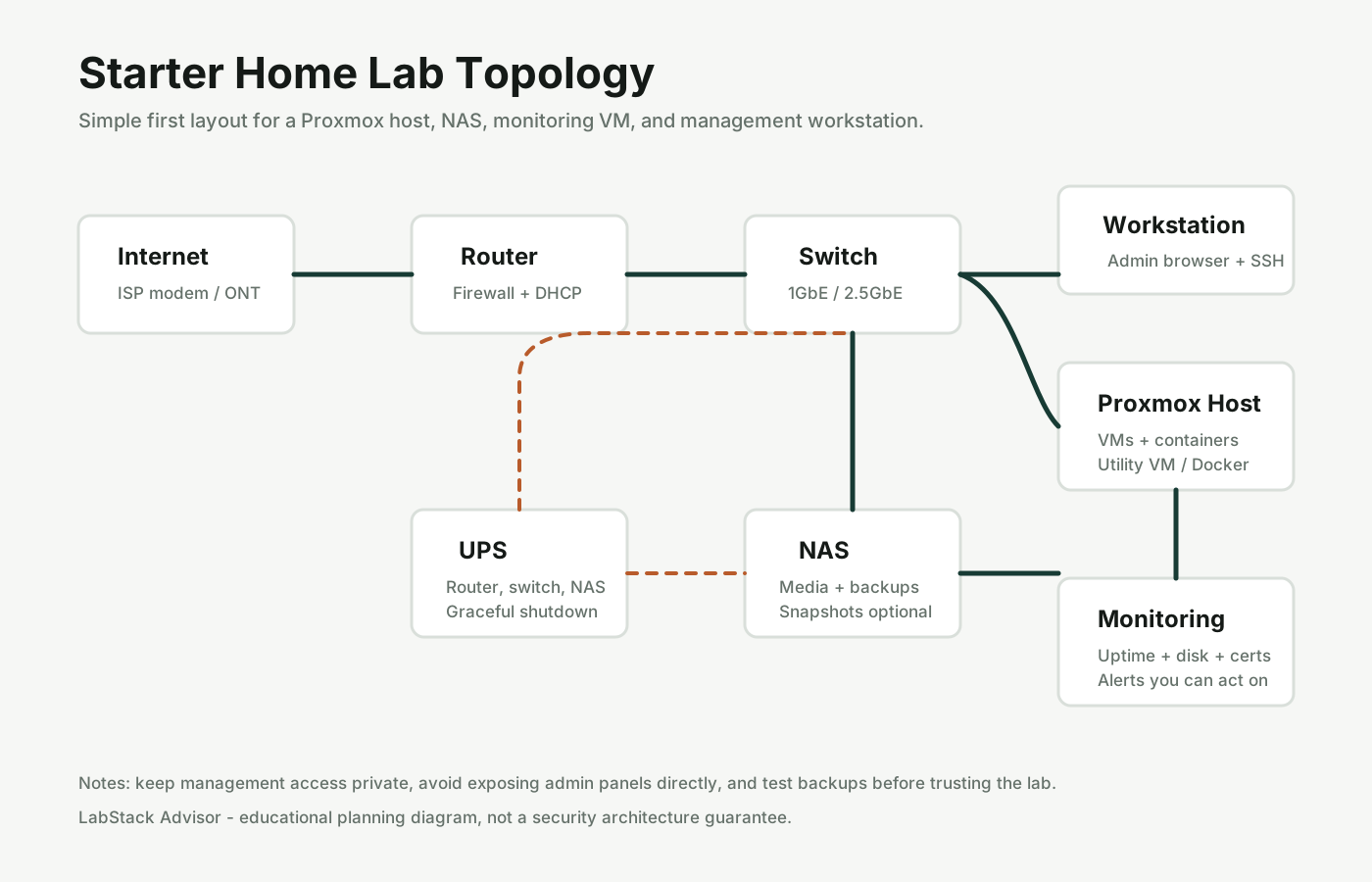
Curriculum
Six-track learning plan
See the planned tracks for Proxmox, Docker, storage, networking, monitoring, and backups.
View the curriculumWhat members would get
Lessons
Beginner paths
Short modules for Proxmox, Docker, NAS storage, DNS, monitoring, backups, and remote access basics.
Configs
Copy/paste templates
Clean Docker Compose files, NGINX examples, backup jobs, firewall notes, and service checklists.
Diagrams
Network maps
Simple diagrams for flat networks, VLAN labs, NAS separation, monitoring, and remote access patterns.
Projects
Monthly builds
One practical project per month, such as uptime monitoring, Proxmox backups, media services, or alerting.
Walkthroughs
Build this stack
Step-by-step builds with parts, topology, install flow, validation checks, and rollback notes.
Community
Private Discord access
A focused place for build logs, progress checks, project questions, and peer accountability.
Example learning tracks
| Track | Outcome | First project |
|---|---|---|
| First Proxmox host | Install Proxmox, create a Debian VM, document IPs, and take the first backup | Single-node utility host |
| Self-hosted services | Run Docker services with persistent storage, updates, and basic health checks | Dashboard plus uptime monitor |
| Storage and backups | Separate data, snapshots, backups, and restore testing | Proxmox Backup Server starter setup |
| Home lab networking | Map devices, reserve IPs, understand VLAN-ready design, and avoid risky exposure | Clean lab network map |
Join the learning waitlist
Use this to signal what you want first. The early version should be built around real demand: projects, configs, diagrams, or community support.
- No payment is collected here.
- Pricing is used only as demand feedback.
- You can reply later to unsubscribe.
Private Discord/community access
The community should be focused on progress, not noise. The goal is to help members finish projects, compare notes, and get unstuck without turning the portal into professional support.
- Monthly project channels with build logs.
- Diagram and config review threads.
- Beginner question space with clear scope limits.
- Show-and-tell for finished stacks and lessons learned.
Community boundaries
No emergency support, compliance guarantees, production security assurance, or managed IT obligations. It stays educational and lab-focused.
Register interestLow-liability positioning
The portal should stay educational and lab-focused. It can teach repeatable patterns, validation steps, and recovery habits without selling professional consulting, compliance guarantees, or security assurance.